





Installing CE 6.0 SDK's on systems with only VS2008 installed
If you are a device manufacturer or are in any other way involved in building Windows CE 6.0 kernels, you undoubtedly also have to generate an SDK for your device so that application developers can create applications targeting your device.
Platform Builder for Windows CE 6.0 plugs into Visual Studio 2005, but the latest and greatest version of Visual Studio that supports "smart device" development is Visual Studio 2008 (unfortunately not Visual Studio 2010, yet?!). Most application developers will use Visual Studio 2008 for smart device development, so that's what your SDK should support in most cases.
You may have noticed that some of your customers are complaining that the SDK installation aborts and rolls back completely. This only happens on systems that do not have Visual Studio 2005 installed:

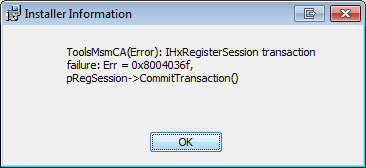


The reason for these "ToolsMsmCA(Error): IHxFilters filter registration failure" and "ToolsMsmCA(Error): IHxRegisterSession transaction failure" errors is that the documentation of the SDK is trying to merge with the Visual Studio namespace "VS.VSIPCC.v80", which is the Visual Studio 2005 namespace. Visual Studio 2008 uses the namespace "VS.VSIPCC.v90", and the namespace "VS.VSIPCC.v80" is not available on systems with only Visual Studio 2008 installed.
The solution is simple:
Open your SDK.sdkcfg file and look for the lines:
<Property NAME="VS Namespace">MS.VSIPCC.v80</Property>
If you want the SDK to install into Visual Studio 2005 then leave these lines as it is, but if you want the SDK to install into Visual Studio 2008 then change the "v80" into "v90":
<Property NAME="VS Namespace">MS.VSIPCC.v90</Property>
and regenerate the SDK.
But what if you have an SDK from a 3rd party and you can't regenerate the SDK? Well, to this problem there are two solutions:
- Do a custom installation of the SDK and de-select the documentation
- Use Orca (or any other msi editor) to change the namespace
Of course "solution" number 1 is not a real solution. What if you really need the documentation of this SDK?
Solution number 2 is of course much better. Orca is in the Microsoft Windows SDK which should be on your machine if you've installed Visual Studio. Take a look in your "Program Files" folder and see if there's a folder "Microsoft SDKs". If there is, you'll find "Orca.msi" in the "bin" folder (if not, install Visual Studio or download the Microsoft Windows SDK here.
Once you've installed Orca you can right click the msi and choose "Edit with Orca". When Orca opens you'll have to select the "Property" table on the left and scroll to the property "VS_NAMESPACE" on the right. Now double click on the value of that property and change "MS.VSIPCC.v80" into "MS.VSIPCC.v90" if you want the documentation to install correctly into Visual Studio 2008.
Of course it would be nice to be able to build one SDK that will install without any problems in any version of Visual Studio that supports smart device development. Without an update to the SDK roller by Microsoft or some more hacking and editing of the MSI using Orca this isn't possible at the moment, but the above solutions will at least give you a way to target either VS2005 or VS2008 with your SDK.
Comments
Hi Michel: I'm trying to edit
Hi Michel:
I'm trying to edit the SDK with Orca. However there is no "VS_NAMESPACE" on the right under "Property".
How can i solve this problem
Re: Hi Michel: I'm trying to edit
Are you sure you selected the "Property" table on the right? Did you scroll down all the way on the left? It should be the last property in the list. If you still can't find it, type CTRL-F in Orca and search for "VS_NAMESPACE". If Orca doesn't find anything then the msi you're editing is not a Windows Embedded CE 5.0/6.0 SDK.
Thanks
This actually worked for me, thanks so much for taking the time to post it.
That was it !
Thanks a lot. Worked perfectly well for the Merlin SDK by NordicID
Hi MICHEAL,I STILL CAN'T FIND THE VS_SPACENAME IN PROPERTY
HI MICHEAL:
I FOLLOW YOUR WAY TO FIND VS_SPACENAME IN PROPERTY.BUT I FIND NOTHING.AND I REINSTALL THE LATESET SDK.BUT I STILL CAN FIND THE "VS_SPACENAME" .I DONT KONW WHY.
Email
Contact me through the contact page and I'll send you an email back so you can put the SDK on an FTP somewhere so I can have a quick peek.
Hi Michel, thank you so much
Hi Michel,
thank you so much for your help, it works properly by me
where is this file located?
where is this SDK.sdkcfg file all i have is 'Win Mobile 6 professional SDK Referesh.msi' which i got from MS
The SDK.sdkcfg file is part
The SDK.sdkcfg file is part of the platform builder environment to generate an SDK. For third party SDK's you should edit the msi file with orca and modify the VS_NAMESPACE property like described in the post.
Good luck
Automate VS2005->VS2008 Target Change?
More and more of our developers are running into this SDK installation problem as they have VS2008 but not VS2005/PB, but there are still a few of us that need VS2005 - Is it possible to automate the Orca part somehow (I'd like to generate the SDK once, copy it, and apply the VS2008 change to the copy)? I saw some WiRunSql.vbs stuff online but I'm not sure the build team will be ok with installing the full Windows SDK on the build engine... I suspect it may be possible to use two separate SDK.sdkcfg files and generate two different SDKs, but that seems like a waste of time (to regenerate the SDK) when all we really want to change is that one part... Thanks!
RE: Automate VS2005->VS2008 Target Change?
Did you see http://makemsi-manual.dennisbareis.com/using_orca_and_msidiff_to_automat...
There are some other tools available for MSI changes as well, but if you want to use Orca you don't need the full SDK install on the build engine, just copy and use orca.exe on the build engine and automate using the information on the above link.
Thank You
This helped me like I asked you in person. Thank you so much
You are the MAN
Thank you so much for posting this. I am an experienced C++ programmer, but a complete beginner at Windows CE development. Seeing the cryptic "ToolsMsmCA(Error): IHxFilters filter registration error" dialog box pop up was not a pleasant welcome. (What a truly awful and unhelpful error message!) I typed that mess into Google and this page was the first result. Five minutes later and I'm successfully running my first Windows CE program on the evaluation board! I'm very happy now.
- Don
Windows Embedded CE 6.0 (with Platform Builder, R2 and R3)
Is it possible to install WinCE 6 with Platform Builder and R2 and R3? This is the only reason why we have VS2005 on our workstations. VS2005 has some problems with Win7 (or vice versa), so VS2008 would be much better (still using XP too...)
RE: Windows Embedded CE 6.0 (with Platform Builder, R2 and R3)
No, unfortunately Platform Builder for Windows CE 6.0 R3 (and R2, but why would you use R2?) is a plugin for VS2005 and does not work as a plugin for VS2008.
Embedded Compact vNext will have everything (platform dev + application dev) in VS vLatest, finally!
The way we use it is:
Windows CE 6.0 R3
-----------------
VS2008 installed on Win7 64bit and a VMWare Win7 32bit image running VS2005 and Platform Builder for CE 6.0 (no application development on the VM)
Embedded Compact 7
------------------
Win7 64bit machine running VS2008 for both platform and application development.
Good luck!
you are great
I was really struggling for 4 hours thinking its a compatibality issue with windows 7. This article really helped me and made me to go home happily from office. Thanks for that
This post is excellent.
This post is excellent. De-selecting the documentation worked seamless.
Plug VS2008 SDK into VS2013
Hi Michael,
I am having a similar problem but it is from VS2008 to new VS2013... I tried to use this "technique" (Change MS.VSIPCC.v90 to MS.VSIPCC.v120) using Orca but it does not work.
Do you know if it is possible? or something about how install old sdk in VC2013 ?
Thanks you
Mauricio de Sousa Coelho
RE: Plug VS2008 SDK into VS2013
VS2013 is using a different ARM compiler and binaries created with this compiler are not compatible with binaries created by the previous version of the ARM compiler, so libraries included in SDKs rolled for versions prior to VS2013 will never work on VS2013. Either use VS2008 for application targeting that SDK, or re-roll the SDK using VS2013 (but the device image will also have to be changed to WEC2013 of course!).
PS. Apologies for the late response; your comment was marked as spam unfortunately..
Thanks for the concise fix to
Thanks for the concise fix to this problem. Much appreciated! This problem occurred on a Grayhill SDK for a 6.5" screen.
Great work Michel. Steps were
Great work Michel. Steps were so clear. This made our task so easy. Much appreciated.
Thanks!
Doing the custom installation without the documentation worked for me!!!!
Best explination ever
I didn't try and edit the 3rd party SDK, I'm in a bit of a rush, but removed documentation and managed to get it installed.
Interestingly, the first time I installed it, it installed successfully, and I do not have VS 2005 installed. Although I might have and another computer on my network booted which did have VS2005 installed.
I discovered this problem when I was unable to build a project which I had built before. When I look at Program Files, this SDK was not available. Where did it go? I didn't remove it.
After I reinstalled the SDK, the VS 2008 build worked as expected.
I have no explanation for what happened to my original install of the SDK, and why it installed correctly with VS2005 not installed.
Thanks!
Worked great for me. Saved me many hours. Thanks!
Thanks!
Editing the vs namespace with ORCA did the trick, thanks so much for the write up!